Back to the collection
Selected work / Portfolio tooling working

Portfolio Workbench

One local view of holdings, cash, private investments, and how allocation differs from your plan.

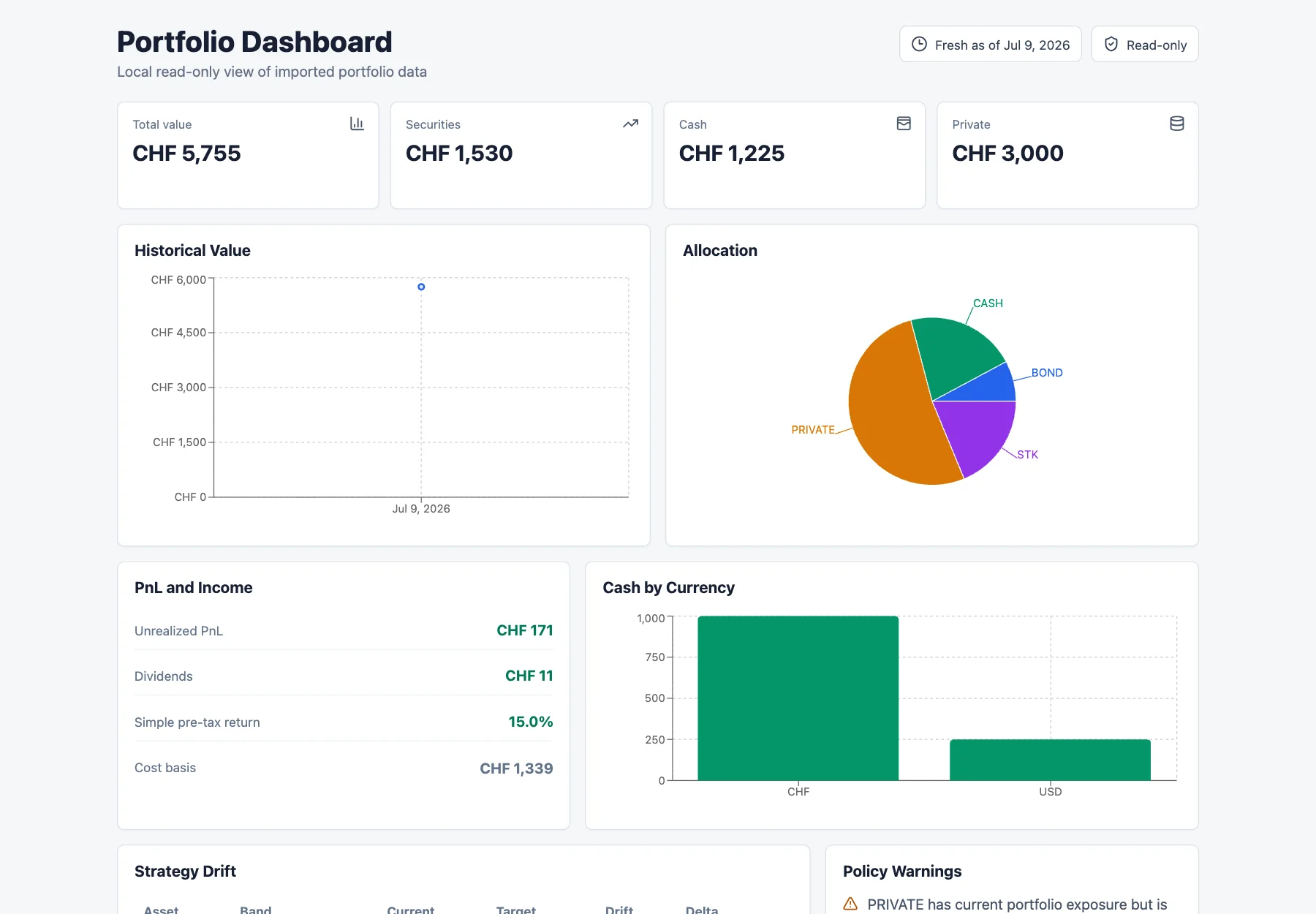
Portfolio Dashboard overview with totals, historical value, allocation, and PnL panels

01 — The brief

Start with the useful tension.

The problem

Reviewing broker-held positions, multi-currency cash, and manually marked private investments needs one local view that explains allocation and policy drift without sending orders.

The audience

A portfolio owner or reviewer using an IBKR Flex export and manually tracked private-investment values.

My contribution

Independently built the local Python and SQLite data layer, read-only Flex import, base-currency calculations, CLI/API surfaces, and React dashboard.

02 — Capability ledger

What exists, what is next.

A plain-language status check, so a polished surface never implies more than the work supports.

Implemented

06
  • Read-only IBKR Flex import

    Parses a local Flex XML report into normalized accounts, instruments, positions, cash balances, trades, dividends, FX rates, private values, and a derived portfolio snapshot; repeated source hashes are skipped.

  • Allocation and holdings overview

    The dashboard presents base-currency totals for securities, cash, and private values alongside historical value, allocation, PnL/income, cash by currency, holdings, and private-investment tables.

  • Base-currency accounting

    Summary and performance calculations convert positions, cash, private marks, and income to the account base currency, preferring same-day FX and then the latest prior rate; the UI labels the resulting CHF totals.

  • Policy-band strategy drift

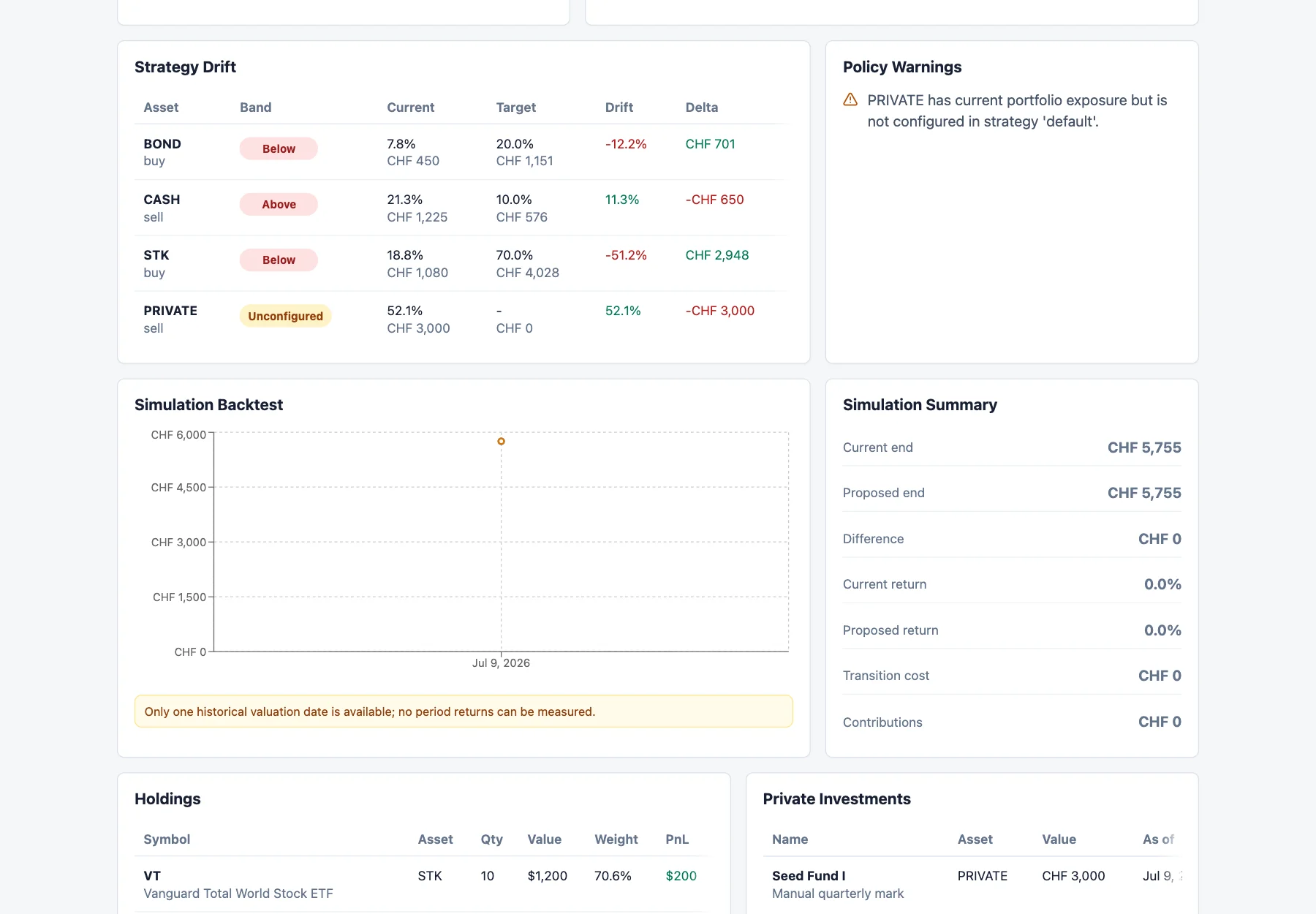
    A default target policy compares current asset-class weights with target/minimum/maximum bands, reports below/inside/above or unconfigured status, and calculates value deltas with buy/sell/hold labels.

  • Scenario simulation and backtest

    Simulation compares current and proposed allocations over available local valuation dates and accepts proposed allocation, contributions, fee, and slippage assumptions; insufficient valuation history is surfaced as a warning rather than treated as a measured period return.

  • CLI, API, and agent inspection surfaces

    Typer/argparse CLI commands and FastAPI routes expose summary, holdings, performance, strategy, rebalance, and simulation payloads; agent context uses a read-only SQLite connection and carries the safety disclaimer.

Planned

00

Nothing recorded here yet.

Unverified

00

Nothing recorded here yet.

03 — Design decisions

The reasoning stays in the room.

01Use a local SQLite source of truth

The project keeps imported records and derived snapshots in a local database and allows the database path to be overridden, which supports private, inspectable workflows and isolated capture data.

02Keep broker and rebalance actions informational

The project intentionally stops at local import and analysis: rebalance suggestions are value deltas, agent commands open SQLite read-only, and the API payload explicitly says that no orders are placed or staged.

03Normalize monetary values before comparing allocations

Positions, cash, private marks, and income can use different currencies, so calculations convert each amount to the account base currency with an explicit same-day/prior-rate fallback policy.

04Represent strategy as policy bands

Target, minimum, and maximum weights let the preview distinguish acceptable exposure from a breach and make the resulting value delta understandable without producing executable trade instructions.

05Make simulation assumptions and data limits visible

The simulation returns its date range, proposed allocation, transition cost, contributions, warnings, and an informational disclaimer; a single valuation date is explicitly treated as insufficient for period returns.

05 — A short walk-through

See the shape of the interaction.

Capture storyboard

Portfolio Workbench: read-only allocation review

0:30
Storyboard · recording not supplied
  1. Open the local dashboard and confirm the Fresh as of Jul 9, 2026 and Read-only indicators.
  2. Review total value, securities/cash/private cards, historical value, and the allocation chart using the labeled synthetic fixture.
  3. Scroll to Strategy Drift and inspect policy bands, current versus target weights, deltas, and the PRIVATE unconfigured warning.
  4. Scroll to Holdings to compare VT and AGG with the Seed Fund I private mark, then stop without invoking any broker or order action.

The materials

Built with care.

Stack
  • Python
  • SQLite
  • FastAPI
  • Uvicorn
  • Typer
  • React
  • Vite
  • TanStack Query
  • Recharts
  • lucide-react
  • PyYAML