Back to the collection
Selected work / Automotive marketplace working

Automobile Marketplace

Find a car through precise filters, useful listing detail, and a closer look at every photo.

Automobile Marketplace car listing grid with photos, prices, mileage and vehicle facts

01 — The brief

Start with the useful tension.

The problem

Car shoppers need a focused way to search a structured inventory, narrow results with vehicle-specific criteria and inspect the details and photos of one listing without losing their place.

The audience

People looking for new or used cars in Switzerland, together with private sellers and dealers who need a structured listing workflow.

My contribution

Independently built the automobile marketplace implementation: the car-specific data model and mode configuration, German search and filtering experience, listing detail and photo inspection flow, local favourites, and the account surface for managing car advertisements.

02 — Capability ledger

What exists, what is next.

A plain-language status check, so a polished surface never implies more than the work supports.

Implemented

05
  • Automobile-specific marketplace mode

    A build-time car mode changes the hero, German copy, favicon, categories, fuel and transmission options, car-only fields and local favourites key; the API selects the matching automobile inventory and serializer rules.

  • Search, facets and car filters

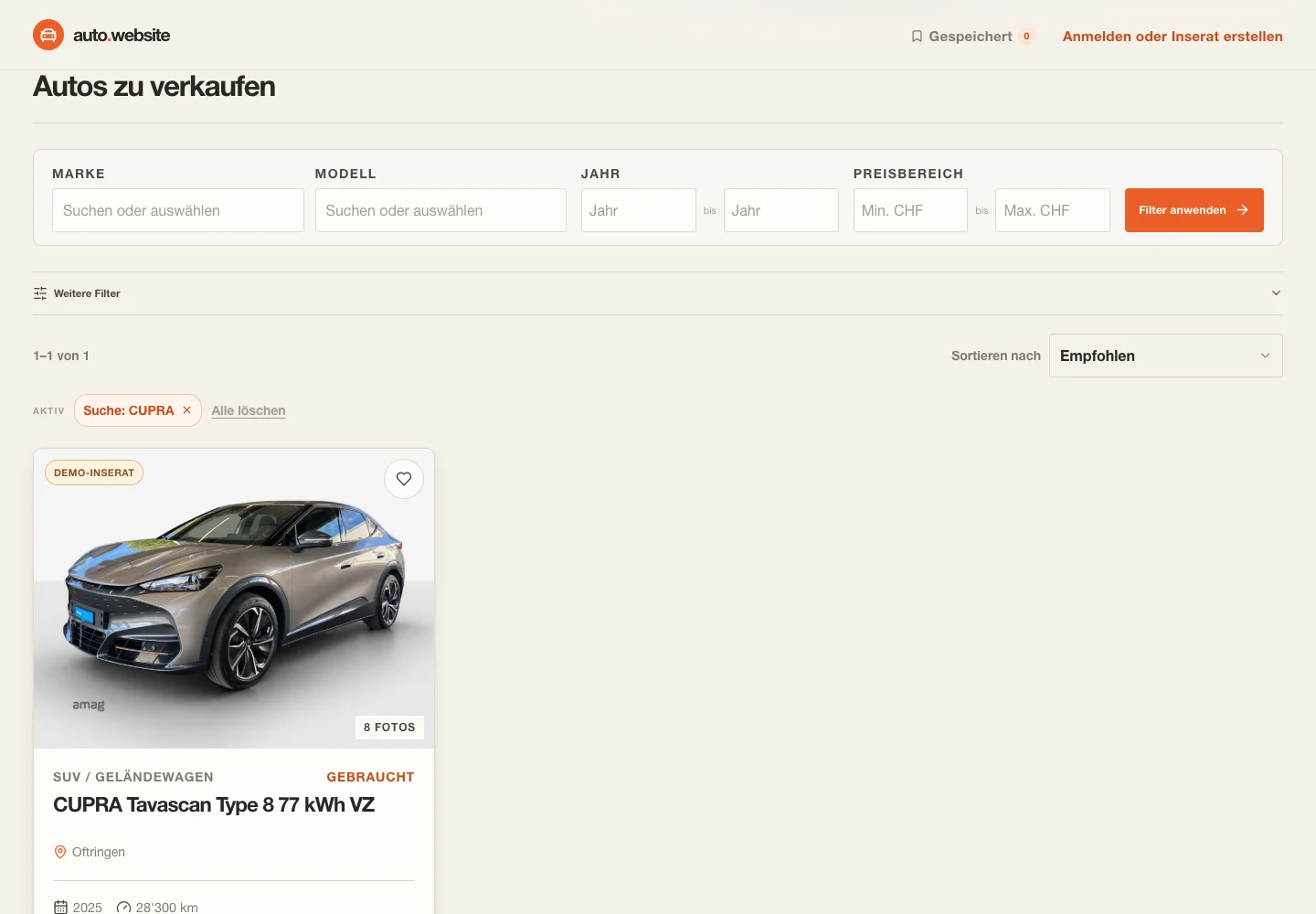
    Visitors can search title, make, model, version or city, select make/model facets, set year and CHF price ranges, open advanced filters for power, fuel, transmission, drive, seats, doors, seller type, body style and condition, then sort and paginate the results.

  • Structured listing detail and photo inspection

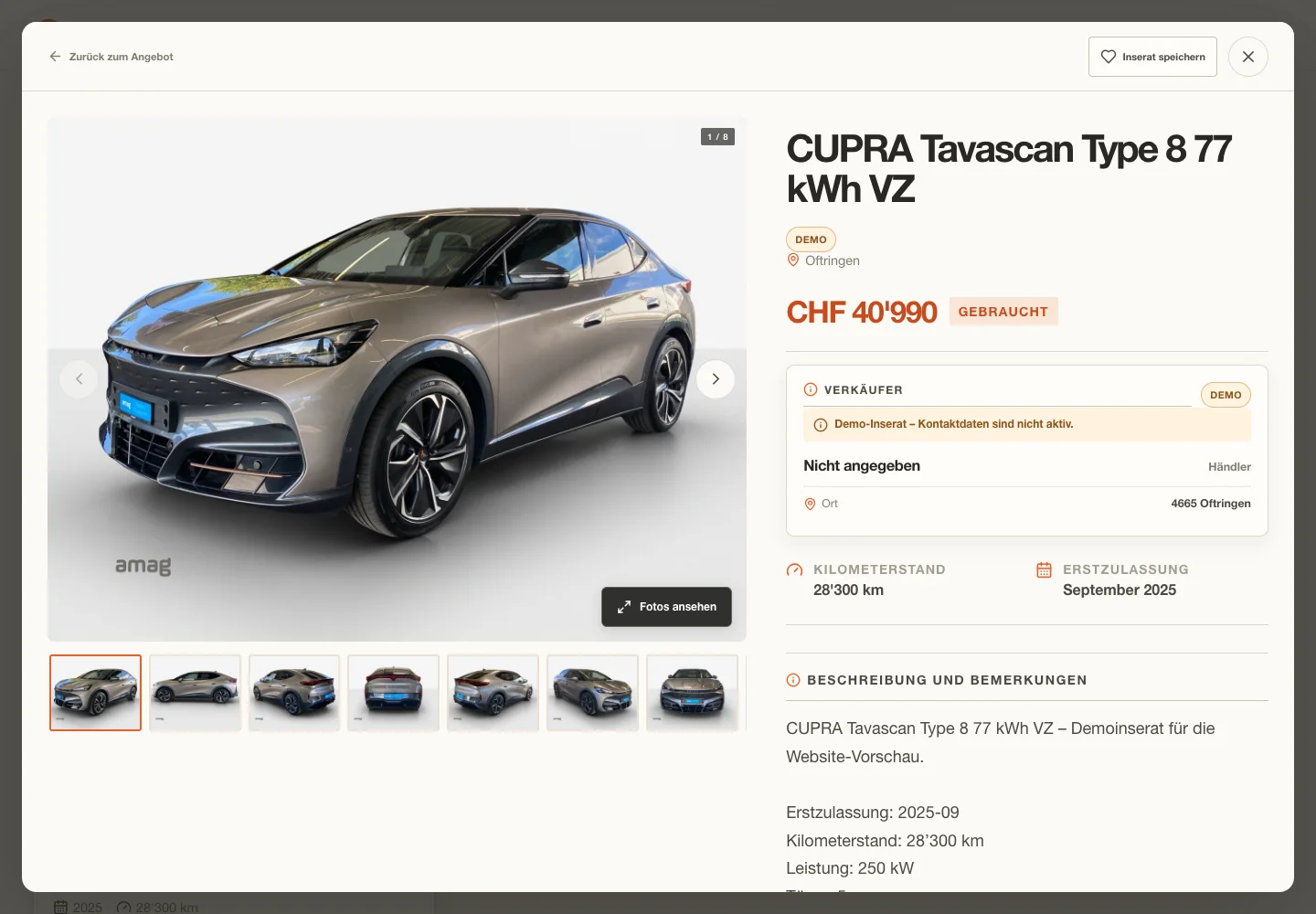
    A listing opens in a URL-addressable detail dialog with price, location, condition, mileage, registration, identity, mechanical data, car-only technical fields, equipment and description; the image gallery supports thumbnails, previous/next navigation and an on-demand PhotoSwipe inspector with zoom.

  • Browser-saved cars

    Visitors can save and remove cars with the heart controls, open a saved-only results view and keep the saved IDs in this browser while the inventory is fetched and paged.

  • Account-based car listing management

    The account surface supports email registration and login, conditional Google/password-reset paths, image uploads, and create/edit/delete workflows for car listings with car-specific fields such as doors, seats, drive type, battery capacity and electric range.

Planned

00

Nothing recorded here yet.

Unverified

00

Nothing recorded here yet.

03 — Design decisions

The reasoning stays in the room.

01Use one shared frontend with an explicit automobile mode

The vehicle configuration centralizes mode-specific copy, imagery, field options and icons while the shared search, detail and account components keep behavior consistent; car-only controls are gated rather than rendered with motorcycle semantics.

02Keep car inventory and account data isolated

The backend resolves separate car paths under data/cars and uses car-specific session and CSRF cookie names, preventing a car deployment from silently attaching to motorcycle data or sessions.

03Make filters and details shareable through URL state

Search, filter, sort, saved-only state and the selected listing are synchronized to query parameters; opening a detail pushes history and closing it returns through browser history when appropriate.

04Load the high-resolution photo inspector only on demand

The initial detail view uses responsive preview images and thumbnails, while the PhotoSwipe core is dynamically imported only after the visitor asks to inspect the gallery; the inspector is configured for bounded navigation, zoom and focus restoration.

05Keep demo contact actions visibly inactive

Demo records are labelled in cards and details, show an explicit inactive-contact notice and render contact actions disabled, so capture data does not imply a live seller relationship.

06Reject mismatched car filters at the API boundary

The server rejects motorcycle-only filters on the car endpoint and nulls motorcycle-only fields during projection, making a mode mismatch explicit instead of returning misleading cross-family data.

05 — A short walk-through

See the shape of the interaction.

Capture storyboard

Automobile search to detail and photo inspection

0:30
Storyboard · recording not supplied
  1. Start at / in the automobile mode with the sanitized local demo inventory visible.
  2. Enter CUPRA in the hero search and submit; show the active search chip and the single matching result.
  3. Open the CUPRA Tavascan card; hold on the detail dialog long enough to show price, location, mileage, registration, car-specific specifications and photo thumbnails.
  4. Select the second thumbnail, activate Fotos ansehen, advance or zoom once in PhotoSwipe, then close with Escape and stop back on the detail dialog.

The materials

Built with care.

Stack
  • React 19
  • TypeScript
  • Vite
  • Lucide React
  • PhotoSwipe
  • Python loopback HTTP server
  • SQLite
  • Pillow and Authlib account dependencies